

Send a hiring need
Tell us the job you need to fill. It takes about a minute.
A hiring need is the job you want to fill. It tells us who to look for.
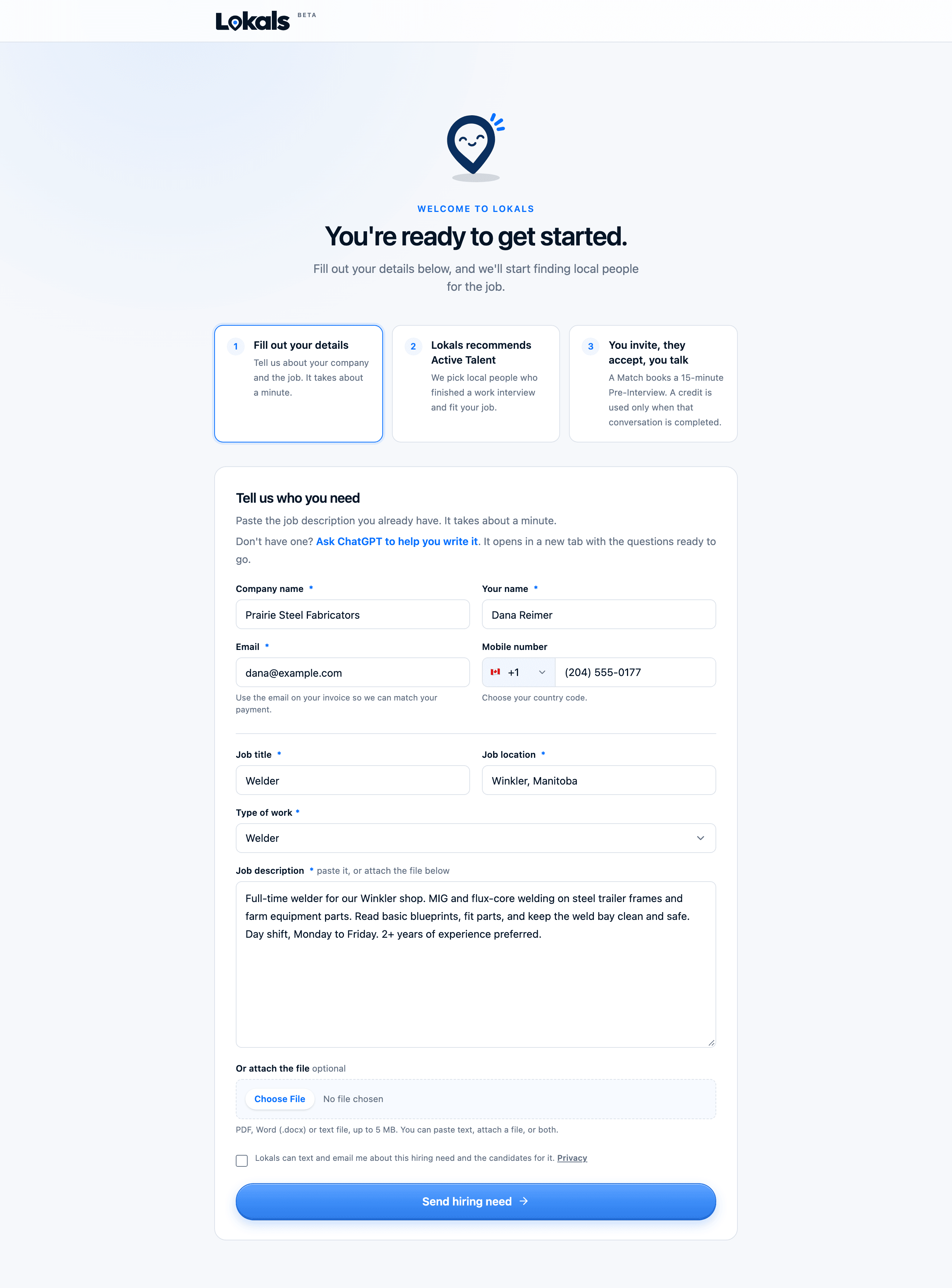
How to send it
- Go to app.lokals.ca/onboarding.
- Enter your company name, your name and your email. Use the email on your invoice, so we can match your payment.
- Enter the job title, the city and the type of work.
- Paste the job description you already have, or attach the file.
- Click Send hiring need.
You can also email or call us with the details. We will fill it in for you.
No job description yet?
The form has a link that opens ChatGPT with questions ready to go. It helps you write a short job description you can paste in.
What to include
The more we know, the better we can match people.
- Duties. What the person will do each day.
- Shift and hours. Days, nights, weekends, overtime.
- Place. The town where the work is.
- Pay. A range is fine.
- Must-haves. Tickets, licences, years of experience, or anything that rules a person out.
- Start date.
Confirm your Hiring Brief
We write a short Hiring Brief from your details. We email you a private link to check it.
- If it's right, click Confirm this Hiring Brief.
- If something is wrong, click Request changes and tell us what to fix.
We use the confirmed brief to pick who to recommend.
Next step
Once you have credits, we start finding people. See How credits work.